
Interaction with other command-line tools
kubectl
It is possible to change the target cluster of kubectl directly with the gardenctl target ... command without having to adjust the KUBECONFIG environment variable again and again. Whether the current target cluster of gardenctl and kubectl should be synchronized or not can be set using the configuration property linkKubeconfig or the GCTL_LINK_KUBECONFIG environment variable.
Behavior with symlink
linkKubeconfig: trueThe target command changes the current target cluster of gardenctl, downloads the corresponding kubeconfig file and creates a stable symlink to the current kubeconfig file in the session directory. If the target is changed the symlink points to the new target but the KUBECONFIG environment variable does not need to be changed. The kubectl-env command now does nothing except creating the script to set the KUBECONFIG environment variable. This even works if nothing is targeted and could be done in the shell profile. 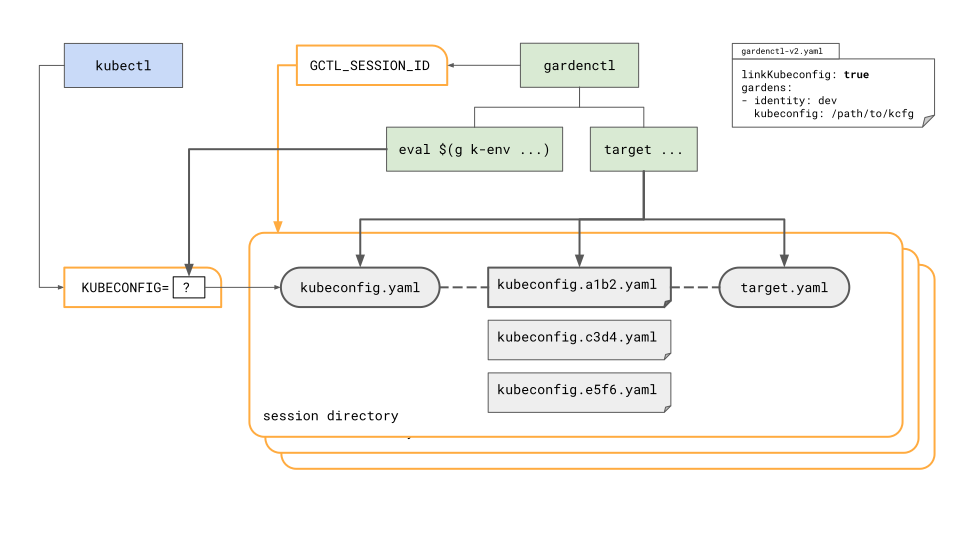 The generated script only needs to be evaluated once per shell session and looks something like this:
export KUBECONFIG=$TMPDIR/garden/$GCTL_SESSION_ID/kubeconfig.yamlBehavior without symlink
linkKubeconfig: falseThe target command only changes the current target cluster of gardenctl, but does not download the corresponding kubeconfig file. This happens only when the kubectl-env command is executed. If the user evaluates the generated script the KUBECONFIG environment variable points the downloaded kubeconfig file for the targeted cluster. 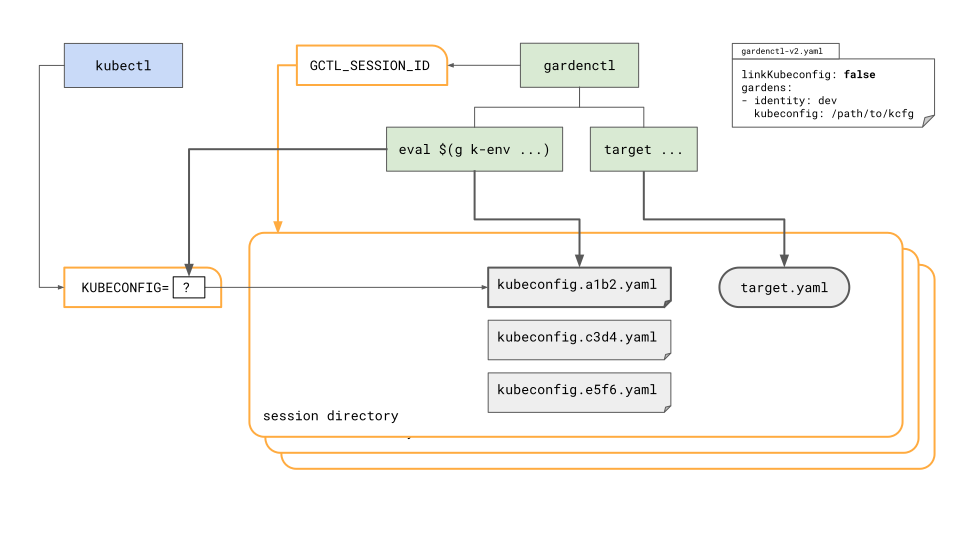 The generated script looks something like this:
export KUBECONFIG=$TMPDIR/garden/$GCTL_SESSION_ID/kubeconfig.<hash>.yaml