
GEP-63: Diki Extension
Summary
Diki is a compliance checker that evaluates the security posture of Kubernetes clusters against pluggable rulesets such as the DISA Kubernetes STIG. Today, Gardener users must install and operate the Diki CLI themselves — scheduling scans, managing configuration, and collecting reports manually.
This GEP proposes a new Gardener extension, gardener-extension-diki, that deploys the diki-operator into shoot cluster control planes. The operator introduces three Custom Resource Definitions — ComplianceScan, ReportOutput, and ScheduledComplianceScan — that allow shoot users to run on-demand and scheduled compliance scans declaratively, with summary results reported directly in resource status fields. The extension follows the standard Gardener extension contract (ControllerRegistration, ManagedResource-based deployment, admission webhooks) and keeps the extension workload inside the seed, avoiding privileged components in the shoot data plane.
Motivation
Compliance scanning is a critical operational concern for Gardener users, particularly those operating in regulated environments that require periodic proof of adherence to security baselines such as the DISA Kubernetes STIG.
Currently, Gardener recommends the Diki CLI for running compliance scans. This places the full operational burden on each user:
- Manual scheduling: Users must set up their own cron jobs or CI pipelines to trigger scans on a recurring basis.
- Version management: Users must track Diki CLI releases and update their installations themselves.
- Configuration management: Each user independently manages Diki configuration files, ruleset versions, and rule options.
- Report collection and storage: Scan results are local JSON files that users must collect, store, and distribute themselves.
- No cluster-native integration: There is no Kubernetes-native way to request a scan, inspect results, or configure recurring scans — everything happens outside the cluster API.
Providing compliance scanning as a first-class Gardener extension removes these burdens and makes compliance accessible to all shoot users through familiar Kubernetes resource semantics.
Goals
- Introduce
gardener-extension-dikias a Gardener extension that deploys thediki-operatorinto shoot control planes on seeds, into thegardennamespace on seeds, and into the garden runtime cluster. - Allow shoot, seed, and garden users to run on-demand compliance scans by creating a
ComplianceScancustom resource in their cluster. - Allow shoot, seed, and garden users to schedule recurring compliance scans via a
ScheduledComplianceScancustom resource. - Provide scan result summaries in the
ComplianceScanstatus, including per-ruleset pass/fail counts and references to detailed report outputs. - Support configurable report outputs via the
ReportOutputcustom resource. - Follow the standard Gardener extension contract (controller registration,
ManagedResource-based deployment, admission webhooks).
Non-Goals
- Remediation of compliance findings. Diki is a detective tool, it reports non-compliance but does not modify cluster resources to fix findings.
- Deploying or managing persistent storage backends for reports (e.g., PostgreSQL, OpenSearch, ODG). The
diki-operatorwill support exporting reports to such storage, but provisioning and operating the storage itself is out of scope. - Integration with the Gardener Dashboard.
Proposal
Introduce gardener-extension-diki as a new extension in the Gardener GitHub organization. The extension follows the Gardener Extension Concept and implements the Extension reconciler contract.
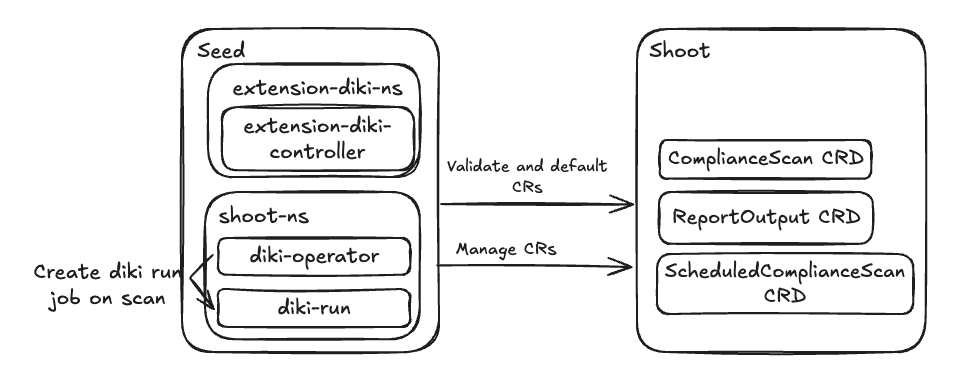
When enabled on a Shoot via spec.extensions[].type: diki, the extension:
- Deploys the
diki-operatorinto the shoot's namespace on the seed. - Applies the three CRDs (
ComplianceScan,ReportOutput,ScheduledComplianceScan) and required RBAC resources to the shoot cluster viaManagedResource.
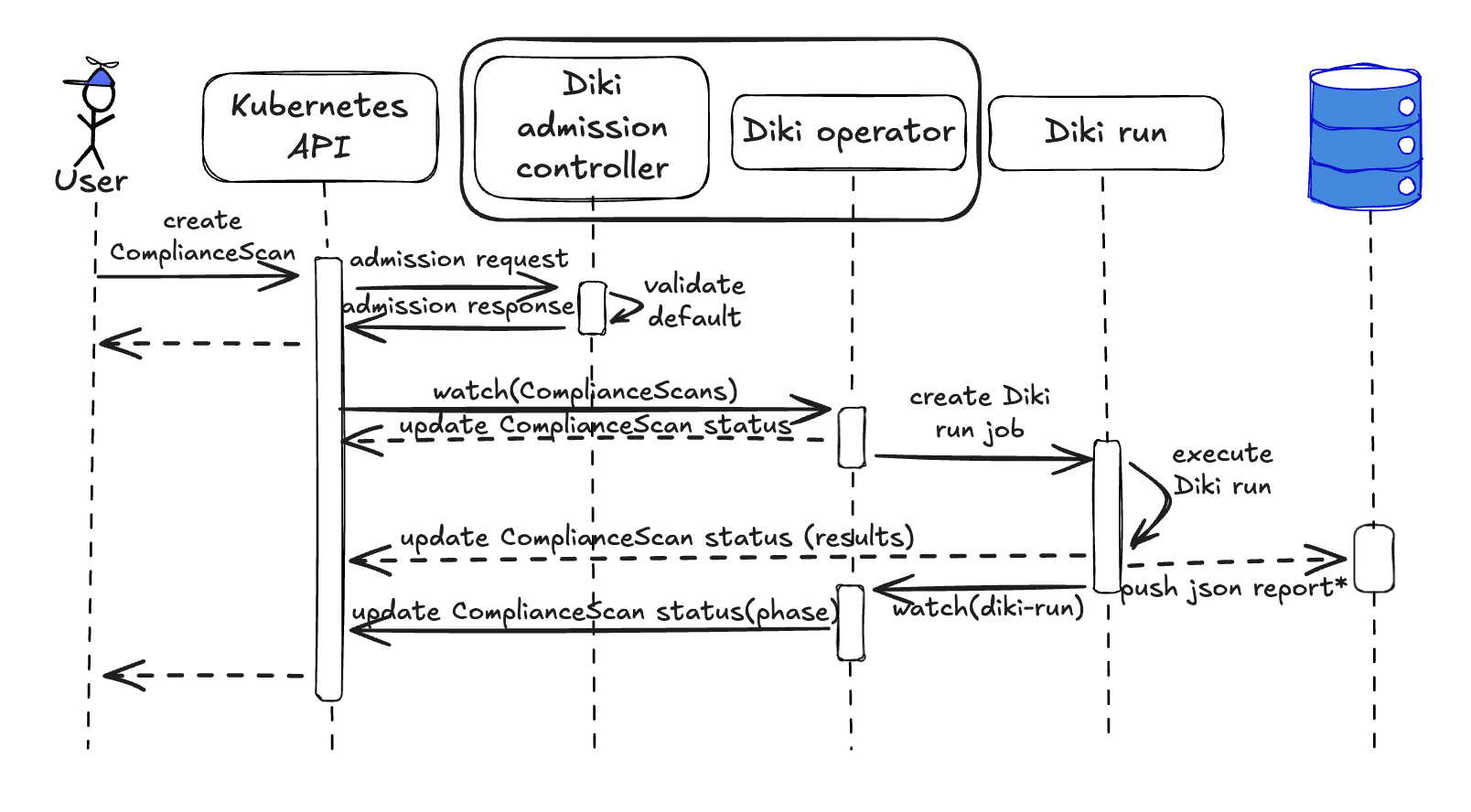
Users interact exclusively through the shoot API server — creating ComplianceScan or ScheduledComplianceScan resources. The diki-operator in the seed watches these resources (via the shoot API server) and orchestrates scan execution by creating diki-run Jobs in the shoot's control-plane namespace. The diki-run Pod writes summary reports back to the ComplianceScan status and exports detailed reports to the configured report outputs.
Notes/Constraints/Caveats
diki-operatoris under active development. The diki-operator repository is in early development. API shapes and component boundaries described in this GEP may change as the implementation matures. The GEP captures the target design.Scan execution happens on the seed, not in the shoot data plane. The
diki-runJob runs in the shoot's namespace on the seed. Running scan Jobs on the seed rather than in the shoot avoids exposing report output credentials (e.g., for a globally preconfigured export destination) to shoot users, and allows scans to run against workerless shoots that have no data plane nodes. The Job needs a shoot access secret with the required RBAC permissions for a Diki scan to access the shoot API server. If scan rules need to read theextensions.gardener.cloud/v1alpha1.Clusterresource (e.g., for Gardener-specific rulesets), the Job would additionally require access to the seed API server. Additional permissions/credentials would be required, depending on the configured outputs (e.g., credentials to write to a PostgreSQL database).Default rule options are provided by the extension. The extension ships default rule options for supported Diki rulesets so that users can run compliance scans without supplying any configuration. Users can add on top of defaults by providing their own ruleset and rule options via
ConfigMapreferences in theComplianceScanspec.
Risks and Mitigations
| Risk | Likelihood | Impact | Mitigation |
|---|---|---|---|
diki-operator API changes during development | High | Medium | The extension will track the operator's API as it stabilizes. CRD versioning (v1alpha1) signals instability to users. |
| Scan Jobs consume excessive seed resources | Medium | Low | The diki-operator creates one diki-run Job per scan. ScheduledComplianceScan history limits (successfulScansHistoryLimit, failedScansHistoryLimit) bound the number of retained scan resources. Concurrent Jobs can be limited. |
| ConfigMap-based report output may strain etcd for large clusters | Medium | Medium | ConfigMap output is intended as a simple solution for small clusters. Reports are compressed (gzip) and stored via BinaryData to stay within the 1 MB etcd limit. For larger clusters, external outputs (e.g., PostgreSQL, OpenSearch) should be used. |
| CRDs in shoot clusters add API surface users may not expect | Low | Low | CRDs are only installed when the extension is explicitly enabled on the shoot. |
Design Details
Extension Registration
The extension is registered either via the Extension resource or via ControllerDeployment and ControllerRegistration.
Key properties:
- The extension supports all three cluster types:
garden,seed, andshoot. - The lifecycle policy is
AfterKubeAPIServerfor reconcile and migrate operations andBeforeKubeAPIServerfor delete operations. - The extension is not globally enabled; shoot owners opt in by adding
type: dikito.spec.extensions[]in their Shoot manifest.
The extension controller is deployed per seed and watches extensions.gardener.cloud/v1alpha1.Extension objects of type diki.
Cluster Compatibility
The extension declares clusterCompatibility for shoot, seed, and garden clusters. The behaviour per cluster type is as follows:
- Shoot: The extension deploys the
diki-operatorinto the shoot's namespace on the seed. CRDs and RBAC are applied to the shoot cluster. Scans evaluate only the data plane. This is the initial implementation target. - Seed: The
diki-operatoris deployed in thegardennamespace of the seed. CRDs and RBAC are applied to the seed cluster. Scans evaluate the data plane. For seeds backed byManagedSeeds, operators may prefer enabling the extension on the backing shoot instead, that would additionally include a control plane scan. - Garden: Both the runtime cluster and the virtual garden cluster are examined. The CRDs (
ComplianceScan,ReportOutput,ScheduledComplianceScan) are located in the runtime cluster. A singleComplianceScancan be configured to scan both the runtime and virtual garden clusters. The human operator decides how scans are configured. If the garden runtime cluster also serves as a seed, the garden extension instance takes priority as it covers both the runtime cluster workload (equivalent to a seed scan) and the virtual garden.
The initial release focuses on shoot cluster support. Seed and garden cluster support will follow in subsequent iterations without requiring changes to the extension registration or architecture. This GEP focuses on the shoot implementation; seed and garden specifics will be detailed in a future GEP or amendment.
API
The extension introduces three CRDs under the diki.gardener.cloud API group. All resources are cluster-scoped in the shoot cluster.
ComplianceScan
apiVersion: diki.gardener.cloud/v1alpha1
kind: ComplianceScan
metadata:
  name: example
spec:
  dikiVersion: v0.24 # defaults to latest available minor version
  rulesets:
    - id: disa-kubernetes-stig
      version: v2r4
      options:
        ruleset:
          configMapRef:
            name: diki-options
            namespace: kube-system
            key: disa-kubernetes-stig
        rules:
          configMapRef:
            name: diki-options
            namespace: kube-system
            key: disa-kubernetes-stig-rules
    - id: security-hardened-k8s
      version: v0.1.0
  outputs:
  - name: example-configmap-output
  - name: example-postgresql-output
  - name: example-opensearch-output
    optional: true # default: false
  - name: example-webhook-output
status:
  phase: Running # Pending | Running | Completed | Failed
  conditions:
  - type: Completed
    status: "True"
    lastUpdateTime: "2025-12-31T23:59:59Z"
    lastTransitionTime: "2025-12-31T23:59:59Z"
    reason: ComplianceScanCompleted
    message: "ComplianceScan completed successfully."
  outputs:
  - outputName: example-configmap-output
    phase: Completed
    details:
      configMapRef:
        name: compliance-scan-report-njdjv
        namespace: kube-system
  - outputName: example-postgresql-output
    phase: Completed
    details:
      postgresRef:
        url: "postgres.example.com:5432"
        database: "diki_reports"
        table: "compliance_reports"
        recordId: "a3f1c9e7-4b2d-4e8a-9f1c-3d5e7a9b1c2d"
  - outputName: example-opensearch-output
    phase: Completed
    details:
      openSearchRef:
        url: "https://opensearch.example.com:9200"
        index: "diki-compliance-reports"
        documentId: "a3f1c9e7-4b2d-4e8a-9f1c-3d5e7a9b1c2d"
  - outputName: example-webhook-output
    phase: Completed
    details:
      webhookRef:
        url: "https://compliance-api.corp.example.com/v1/reports"
  rulesets:
  - id: disa-kubernetes-stig
    version: v2r4
    results:
      summary:
        passed: 42
        failed: 3
        warning: 1
        errored: 0
        skipped: 2
        accepted: 0
      rules:
        failed:
        - id: "V-242381"
          name: The Kubernetes API Server must have an audit policy set.
  - id: security-hardened-k8s
    ...
The ComplianceScan resource represents a single compliance scan execution. Its spec is immutable after creation. The spec.rulesets field allows users to select which rulesets to include and at which version; it defaults to all available rulesets at their latest versions. Ruleset and rule options are supplied via ConfigMap references. The spec.outputs field references ReportOutput resources that define where detailed reports are stored. Each output entry has an optional field (defaults to false). A scan is considered successful only if all non-optional outputs accept the report; failures on optional outputs do not fail the scan.
The status section is updated by the diki-run Job as the scan progresses. On completion, status.rulesets[].results contains per-ruleset summaries and lists of findings, and status.outputs contains references to the stored detailed reports. The diki-operator watches ComplianceScan status to track Job completion and manage the ScheduledComplianceScan lifecycle.
ReportOutput
apiVersion: diki.gardener.cloud/v1alpha1
kind: ReportOutput
metadata:
  name: example-configmap-output
spec:
  output:
    configMap:
      namePrefix: compliance-scan-report-
The ReportOutput resource defines a storage destination for detailed compliance reports. It is immutable and can be referenced by multiple ComplianceScan resources. Each ReportOutput defines exactly one output type. The initial implementation supports ConfigMap-based output; additional outputs will be added in future iterations (e.g., PostgreSQL, OpenSearch).
NOTE
ConfigMap report outputs have an ownerReference to the originating ComplianceScan and are automatically deleted when the ComplianceScan is removed. Reports stored in external systems (e.g., PostgreSQL, OpenSearch) are not cleaned up and remain as-is.
Example ReportOutput for PostgreSQL
apiVersion: diki.gardener.cloud/v1alpha1
kind: ReportOutput
metadata:
  name: example-postgresql-output
spec:
  output:
    postgresql:
      url: "postgres.garden.svc:5432"
      database: "diki_reports"
      table: "compliance_reports"
      credentialsRef:
        apiVersion: v1
        kind: Secret
        name: postgresql-credentials
        namespace: kube-system
      tls:
        enabled: true
        caSecretRef:
          name: postgresql-ca
          namespace: kube-system
          key: ca.crt
Example ReportOutput for OpenSearch
apiVersion: diki.gardener.cloud/v1alpha1
kind: ReportOutput
metadata:
  name: example-opensearch-output
spec:
  output:
    openSearch:
      url: "https://opensearch.garden.svc:9200"
      index: "diki-compliance-reports"
      credentialsRef:
        apiVersion: v1
        kind: Secret
        name: opensearch-credentials
        namespace: kube-system
      tls:
        enabled: true
        caSecretRef:
          name: opensearch-ca
          namespace: kube-system
          key: ca.crt
Example ReportOutput for Webhook (custom HTTP endpoint)
apiVersion: diki.gardener.cloud/v1alpha1
kind: ReportOutput
metadata:
  name: example-webhook-output
spec:
  output:
    webhook:
      url: "https://compliance-api.corp.example.com/v1/reports"
      credentialsRef:
        apiVersion: v1
        kind: Secret
        name: webhook-headers
        namespace: kube-system
      tls:
        enabled: true
        caSecretRef:
          name: webhook-ca
          namespace: kube-system
          key: ca.crt
ScheduledComplianceScan
apiVersion: diki.gardener.cloud/v1alpha1
kind: ScheduledComplianceScan
metadata:
  name: weekly-compliance-scan
spec:
  schedule: "0 0 * * 0" # cron expression, defaults to weekly on Sunday at midnight
  timeZone: "Etc/UTC" # optional, defaults the diki-operator's local timezone
  successfulScansHistoryLimit: 1
  failedScansHistoryLimit: 3
  scanTemplate:
    spec:
      dikiVersion: v0.22
      rulesets:
        - id: disa-kubernetes-stig
          version: v2r4
      outputs:
      - name: example-configmap-output
status:
  active:
    name: weekly-compliance-scan-28459230
  lastScheduleTime: "2025-12-28T00:00:00Z"
  lastCompletionTime: "2025-12-28T00:12:34Z"
The ScheduledComplianceScan resource allows users to define recurring compliance scans following the CronJob/Job pattern. The operator creates ComplianceScan resources according to the cron schedule and manages their lifecycle. History limits control how many completed and failed ComplianceScan resources are retained. The operator can apply a random jitter (up to 15 minutes) to the scheduled time to avoid peak load when multiple scans are scheduled at the same time.
Components
diki-extension-controller
Runs on the seed as a standard Gardener extension controller. Responsibilities:
- Watch
Extensionobjects of typediki. - Deploy the
diki-operatorto the shoot's seed namespace viaManagedResource. - Apply CRDs, RBAC, and additional resources to the shoot cluster via
ManagedResource.
diki-operator
Runs in the shoot's seed namespace. Responsibilities:
- Watch
ComplianceScanresources via the shoot API server. - Watch
ScheduledComplianceScanresources and createComplianceScanresources on schedule. - Launch
diki-runJobs in the shoot's seed namespace to execute scans. - Watch
ComplianceScanstatus for scan completion (status is written by thediki-runJob). - Update
ComplianceScanphase on failed execution and scan completion. - Validate
ComplianceScan,ReportOutput, andScheduledComplianceScan - Apply defaults.
diki-run
A Job created by the diki-operator in the shoot's seed namespace for each scan execution. The Job is responsible for running the Diki compliance scan, exporting detailed reports to the configured outputs, and writing summary results back to the ComplianceScan status. Structure:
apiVersion: batch/v1
kind: Job
metadata:
  name: diki-run-example
spec:
  template:
    spec:
      restartPolicy: Never
      containers:
      - name: diki-scan
        image: "europe-docker.pkg.dev/gardener-project/releases/gardener/diki:v0.24.0"
        args:
        - run
        - --config=/config/config.yaml
        - --all
        - --output=/output/report.json
        volumeMounts:
        - name: shared-volume
          mountPath: /output
        - name: diki-config
          mountPath: /config
      - name: report-exporter
        image: "europe-docker.pkg.dev/gardener-project/releases/gardener/diki-operator/report-exporter:v0.1.0"
        args:
        - --config=/config/exporter-config.yaml
        volumeMounts:
        - name: shared-volume
          mountPath: /output
        - name: exporter-config
          mountPath: /config
      volumes:
      - name: shared-volume
        emptyDir: {}
      - name: diki-config
        configMap:
          name: diki-config
      - name: exporter-config
        configMap:
          name: exporter-config
The diki-scan container runs the Diki CLI with the configured rulesets and writes a JSON report to a shared volume. The report-exporter container reads the report, writes it to the configured outputs, and updates the ComplianceScan status in the shoot cluster (via the shoot API server) with summary results (per-ruleset pass/fail counts, failed rule lists, and output references).
Lifecycle Management
| Phase | Behaviour |
|---|---|
| Reconcile | Deploys diki-operator to the shoot namespace on the seed. Creates a ManagedResource with CRDs, RBAC, and supporting resources for the shoot cluster. Waits for ManagedResource health before marking the Extension as reconciled. |
| Delete | Deletes the diki-operator deployment and the ManagedResource. This includes the CRDs, which triggers cascade deletion of all ComplianceScan, ReportOutput, and ScheduledComplianceScan custom resources. Waits for all managed objects to be removed from the shoot cluster before completing. |
| Migrate | During a control-plane migration, running ComplianceScans will be interrupted and marked as failed. The extension controller will recreate the diki-operator deployment on the new seed, and the operator will resume normal operation. Scheduled scans will continue to run on the new seed according to their schedule. |
Future Enhancements
- Security-hardened shoot cluster ruleset: Diki includes a security-hardened shoot cluster ruleset that evaluates Gardener-specific security properties. Some rules in this ruleset require access to the garden cluster (e.g., to inspect Shoot and CloudProfile resources). Supporting this ruleset will require a mechanism for the diki-run Job to obtain scoped, read-only garden cluster credentials — a design that is deferred to a future iteration.
- Version management: Expose available Diki versions and ruleset versions to users via the API.
- Persistent storage backends: Add support for PostgreSQL, OpenSearch, and ODG as report output destinations, removing the ConfigMap size limitation. Additionally, there should be an option to export to a custom HTTP endpoint.
- Dashboard integration: Integrate with the Gardener Dashboard to visualize compliance scan summary results, and allow users to trigger scans from the UI.
- Report access proxy: Provide an authenticated proxy or server for accessing stored compliance reports.
- Seed and garden cluster scans: Implement the extension reconciliation logic for seed and garden cluster types. The extension registration already declares compatibility (see Cluster Compatibility), but support for these cluster types is deferred to a future iteration.
Drawbacks
- Dependency on an in-development operator. The
diki-operatoris under active development and its APIs are not yet stable. This can cause breaking changes across versions and slow down development of the extension.
Alternatives
Central Compliance Service in a Dedicated Cluster
An alternative architecture would deploy the compliance CRDs (ComplianceScan, ReportOutput, ScheduledComplianceScan) as namespaced resources in the garden cluster, while running the compliance operator in a separate dedicated cluster (e.g., a separate shoot). Each ComplianceScan would target a specific shoot via a spec.targetShoot field, and users would manage all their compliance resources from their project namespace in the garden cluster.
This approach was rejected because:
- It increases the garden cluster's API load and complexity. Emboldens teams to also deploy more CRDs in the garden cluster.
- It turns the dedicated cluster into a single point of failure for compliance scanning.
- It requires the central operator to obtain credentials for every target shoot.
Trivy Operator for Compliance Scanning
Another alternative considered was leveraging the Trivy Operator — a Kubernetes-native security scanner that can perform CIS benchmark checks. Instead of building a custom extension around the diki-operator, the compliance scanning functionality could be delegated to Trivy Operator deployed into shoot clusters or their control planes.
This approach was rejected because:
- Diki implements Gardener-aware rules. The diki rulesets understand Gardener-specific architecture (e.g., control plane on seed) and can evaluate rules in this context. Trivy Operator treats every cluster as a generic Kubernetes installation.
- Trivy Operator does not support the DISA Kubernetes STIG ruleset.